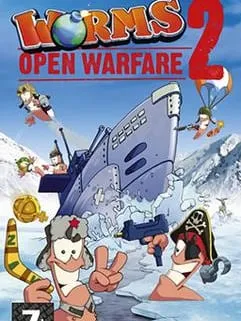
About Worms: Open Warfare 2
Team17 made Worms: Open Warfare 2 together with Two Tribes, and THQ released it in 2007 on two handhelds, the PSP and the Nintendo DS. Picking up where the first Open Warfare left off, it keeps the series formula: teams of worms take turns on a destructible landscape, and on each turn you choose one weapon, set the angle and power, and try to knock your opponents into the water or off the map.
Wind, terrain and timing all matter. A shot that would land perfectly on a calm turn can drift wide in a strong breeze, and every explosion reshapes the ground for whoever moves next. The arsenal mixes plain tools like the bazooka and grenades with the series’ stranger weapons, such as the exploding sheep.
How it runs in your browser
The version linked here is the PSP edition, set up to run in a web page by dezm0n. It lives on dezm0n’s itch.io page, which opens in a new tab instead of playing inside our site. Once the page has loaded, press its Run game button to start.
Save support isn’t listed, so assume campaign progress may not carry over between visits. There’s no online multiplayer either. That said, Worms has always been a pass-the-controls game, and the host notes it can be played solo or with a second person. Because the game is turn-based, a second player can sit beside you and take over on their turn.
Controls and devices
You’ll need a computer with a keyboard. The port isn’t set up for phones or tablets, and controller support isn’t listed. The PSP’s buttons are mapped to keys on your keyboard; the itch.io page is the place to look for the exact layout before you start.
Tips
- Check the wind indicator before every shot, especially with the bazooka.
- Use the terrain: blasting away a ledge can leave an enemy worm with nowhere to stand.
- Save your strongest weapons for turns when several enemy worms are bunched together.
- Water is usually the quickest way to finish a worm, so aim to push enemies toward it rather than whittle down their health.
This version suits anyone who remembers the PSP or DS release, or who wants a quick round of classic Worms without installing anything. It works best for one player against the computer, or for two people sharing a keyboard.
Is Worms: Open Warfare 2 Free, Safe and Official?
Is Worms: Open Warfare 2 free to play here?
Yes. The browser version is free and needs no install. It opens on dezm0n’s itch.io page, where you press Run game to start.
Can I play Worms: Open Warfare 2 with a friend?
There’s no online play, but the host says you can play with a friend. Since the game is turn-based, you can take turns at the same computer.
Does Worms: Open Warfare 2 work on a phone?
No. This version is meant for a desktop or laptop browser with a keyboard, and phones and tablets aren’t supported.