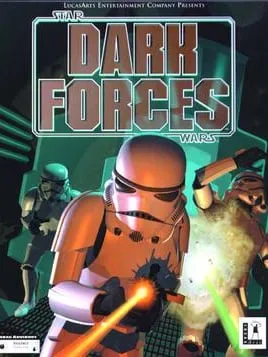
About Star Wars: Dark Forces
Star Wars: Dark Forces is a first-person shooter that LucasArts developed and published. It came out in 1995 for MS-DOS and the Macintosh, and in 1996 for the PlayStation. The story belongs to the Star Wars expanded universe. It opens shortly before the original Star Wars film, then jumps to a year after the film’s events.
You play Kyle Katarn, a mercenary working for the Rebel Alliance. He discovers the Galactic Empire’s secret Dark Trooper Project, which is developing a series of powerful new battle droids and power-armored stormtroopers. DOS.Zone’s own description calls Katarn a former Imperial agent and mentions a range of levels, enemies and weapons.
Daron Stinnett directed the game and designed it with Ray Gresko and Justin Chin, and Clint Bajakian composed the score. It was built on LucasArts’ Jedi engine, it is single-player only, and it belongs to the Star Wars: Jedi Knight series. A remaster from Nightdive Studios, which uses the KEX Engine, was released for the Nintendo Switch, PlayStation 4 and 5, Windows, Xbox One and Xbox Series X/S. Lucasfilm Games, part of Disney, holds the rights.
How it runs in your browser
When you press Play, dos.zone opens in a new tab and loads the original MS-DOS release in js-dos. That’s DOS.Zone’s open-source DOSBox build for browsers, and it emulates an old PC inside the tab. You don’t install anything or provide game files, since DOS.Zone stores them, and you don’t make an account. The site carries no ads.
The listing is tagged as a 3D action game and a first-person shooter for the IBM PC, and it has a rating of 5 from 14 player reviews. It doesn’t explain how saving works, so check the game’s menus before a long mission.
It’s worth knowing that DOS.Zone listings can disappear. The site has removed games before at a publisher’s request, taking down GTA 1 and 2 after Take-Two asked, so there’s no promise this one will stay up.
Controls and devices
Dark Forces is played with a keyboard and mouse here. Click inside the emulator once the game has loaded so your input reaches it. DOS.Zone doesn’t list the key bindings, so look through the game’s own setup and options to see what each key does.
DOS.Zone adds virtual on-screen controls on phones, but a shooter built for a keyboard and mouse is much easier on a computer. Chromebooks haven’t been tested.
Who it’s for
It suits Star Wars fans who want to play Kyle Katarn’s fight against the Dark Trooper Project in its original MS-DOS form, and shooter players who know Doom and want to see a 1995 shooter set in the Star Wars galaxy. If you like LucasArts’ games from the same period, Full Throttle, its 1995 adventure, is on DOS.Zone too.
Is Star Wars: Dark Forces Free, Safe and Official?
Can I play Star Wars: Dark Forces online for free?
Yes. DOS.Zone runs the MS-DOS version free in a browser tab, with no account and no download. Dark Forces is a single-player game, so there’s no online mode to look for.
Is this the Dark Forces remaster?
No. It’s the original 1995 MS-DOS game running in an emulated PC. The remaster is a separate release by Nightdive Studios, built on the KEX Engine.
Does Dark Forces work on a phone?
DOS.Zone offers virtual on-screen controls on phones, but Dark Forces was made for a keyboard and mouse, so a desktop or laptop is the better choice.