About Mahjong Connect
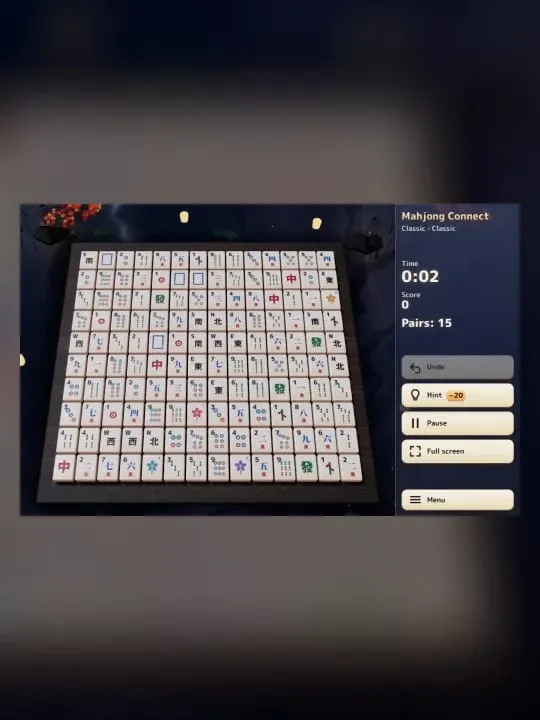
Mahjong Connect is a tile-matching puzzle that borrows the tiles of the Chinese game of mahjong: the numbered suits of circles, bamboo and characters, the winds and dragons, and flowers. Unlike mahjong solitaire, where tiles are stacked in a pile, every tile here lies face up on a single flat board.
The rules are short:
- Match identical tiles. Two tiles with the same picture make a pair, and any two flower tiles match each other.
- Join them with a line. The line runs horizontally and vertically, bends no more than twice and can’t cross another tile. It may run along the empty strip just outside the board, so tiles on the edges are often the easiest to pair.
- Clear the board. Take every pair to win. If no pair can be joined, the game shuffles what’s left at no cost.
ManyPlay’s version is set in a night garden, and each pair you take floats away as a paper lantern. The full Classic board has 140 tiles, and Mini and Small boards suit a shorter break. Besides the standard game there are Shift and Timed modes and a daily deal that gives everyone the same board, and you can swap the classic tiles for a set of garden animals. A short tutorial runs on your first board, and Hint and Undo buttons are always beside it.
Mahjong Connect is made by ManyPlay, a catalogue of original browser games run by Manyplay Games Inc., which sent the game to us. ManyPlay also makes Ludo, Tic Tac Toe and 3D Snake. It says the art, sounds and music were made with AI tools, while the game itself is its own code.
How it runs in your browser
Mahjong Connect is made for the browser, so there’s nothing to install. Play opens the game’s page on ManyPlay in a new tab, where you choose Play to load the board, with a full-screen option.
On 23 November 2026, in desktop Chrome, the game opened on a Mini board in Classic mode, with a timer, a score and a counter showing 8 pairs that could be taken. The tutorial asked us to find two identical tiles side by side. We tapped two South wind tiles, they cleared, and the score went to 10. The next tutorial step showed a dotted line with two turns linking a pair of nine-circle tiles. We played the opening moves and didn’t clear a whole board.
Controls and devices
You click or tap two tiles to match them; the rest is buttons for Hint, Undo, Pause and full screen. ManyPlay says the game works with a mouse or touch, including on phones. We tested it on a desktop computer, not on a phone or Chromebook.
Tips
- Start at the edges: tiles there can use the free strip around the board, so they’re usually easier to pair.
- Count the turns before you tap. Two tiles that sit close together may still need a third bend, which isn’t allowed.
- Save hints for later; each costs 20 points, while the shuffle at a dead end is free.
- When two copies of a tile are left and they block each other, clear the tiles around them first.
For a different game with mahjong tiles, try the roguelike Outlaw Mahjong. ManyPlay’s Ludo and Tic Tac Toe are calm games to play against the computer, and WhoDunItDoku is a daily logic puzzle.
How to Play Mahjong Connect: Controls
| Action | Keyboard & mouse | Touch |
|---|---|---|
| Pick a tile | Click a tile | Tap a tile |
| Match a pair | Click a second identical tile that a line can reach | Tap the second tile |
Is Mahjong Connect Free, Safe and Official?
Can I play Mahjong Connect online for free?
Yes. ManyPlay’s Mahjong Connect is free in your browser on a phone or computer, with nothing to download and no sign-up. ManyPlay says its site has no ads.
How do you play Mahjong Connect?
Every tile lies face up. Tap two identical tiles to remove them, but only if a line can join them with no more than two turns. The line runs horizontally and vertically, can’t pass through other tiles, and may use the empty strip around the edge of the board. Clear every tile to win.
What happens when there are no moves left?
The game shuffles the remaining tiles for you, and the shuffle costs no points. A hint, which shows you a pair, costs 20 points, and Undo takes back your last pair.
Is Mahjong Connect the same as mahjong solitaire?
No. In mahjong solitaire the tiles are stacked in layers and you can only take free tiles from the edges of the pile. In Mahjong Connect all the tiles sit flat on one layer, and what matters is whether a line with two turns or fewer can link the pair.