About 3D Snake
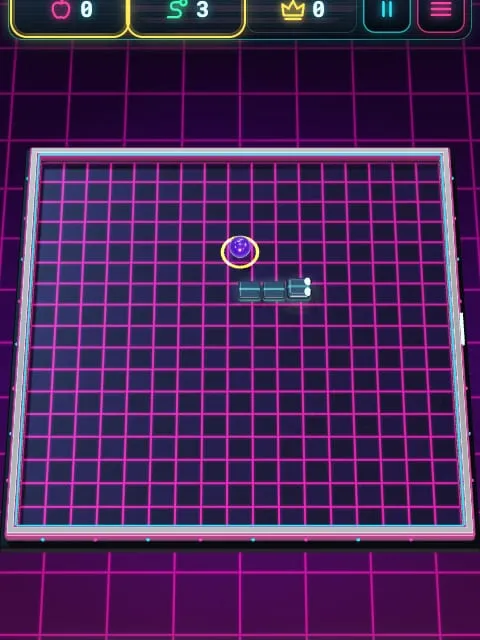
Snake is the classic arcade game: steer a snake around the board, eat fruit, grow longer, and never run into a wall or your own tail. ManyPlay’s version keeps those rules and draws the board as a neon 3D diorama, sized so it stays readable on a phone.
The snake moves on its own, one cell at a time, and you only choose where it turns. It can’t reverse into itself, so a U-turn takes two turns. Every fruit adds one cell to the snake and 10, 20 or 30 points depending on the speed you picked, and taking the shortest safe route to a fruit earns a bonus of up to half a fruit more. A run ends when the head hits a wall or the body, and filling every cell of the board is a perfect snake, the best result possible.
There are several ways to play:
- Classic, with walls around the board
- No walls, where the snake passes through one edge and comes out of the other
- Two players, with two snakes on one screen
- Kids, a slow snake on a smaller 13 × 13 board
- Daily run, the same board for everyone that day, with weekly and all-time tables
You can also unlock skins for your snake. Your best scores, skins and settings are saved in your browser, and a run left in the middle can be continued from the main screen.
3D Snake is made by ManyPlay, a catalogue of original browser games run by Manyplay Games Inc., which sent the game to us. ManyPlay also makes Ludo, the classic race board game. ManyPlay says the movement rules follow JavaScript-Snake by Patrick Gillespie, released under the MIT license, that the board is drawn with three.js, and that the cover illustration, sounds and music were made with AI tools.
How it runs in your browser
3D Snake is made for the browser, so there’s nothing to install. Play opens the game’s page on ManyPlay in a new tab, where Play now starts the game in ManyPlay’s player. The game page comes in 15 languages.
On 18 November 2026, in desktop Chrome, the game opened on its menu with a guest name and the modes listed: Classic, No walls, Two players and Kids, a speed choice of Slow, Normal or Fast, and the daily run for 18.11.2026. Play started a run on the neon board with a short tutorial: “Turn the snake”, then “Eat the fruit”. ManyPlay’s player was slow to load the first time and offered a Retry button, which then brought up the same menu.
Controls and devices
On a computer you steer with the arrow keys; in two-player mode the second snake uses WASD. On a phone or tablet you swipe anywhere on the board. ManyPlay says it plays in any browser on a computer or phone. We tested it on a desktop computer, including in a phone-sized window, but not on a real phone.
Tips
- Turn early. The snake keeps moving, so plan the turn before the head reaches a wall.
- Leave yourself a way out: don’t chase a fruit into a corner your tail will close off.
- Try No walls when you’re learning; going through the edges forgives a lot of mistakes.
- The daily run is the same for everyone, so it’s the fairest way to compare scores with friends.
For snake games against other players online, try Slither.io or Little Big Snake.
How to Play 3D Snake: Controls
| Action | Keyboard & mouse |
|---|---|
| Turn the snake | Arrow keys, or swipe |
| Second player (two-player mode) | WASD against the arrow keys |
| Pause | Pause button |
Is 3D Snake Free, Safe and Official?
Is 3D Snake free?
Yes. It’s free in your browser with no download and no sign-up. ManyPlay says the game player itself has no ads; ads may appear only on its information pages.
Can two people play snake on one computer?
Yes. Two players mode puts two snakes on one screen, with one player on WASD and the other on the arrow keys.
Is there an easy mode for kids?
Yes. Kids mode uses a smaller 13 × 13 board and a slow snake, and you can also switch the walls off so the snake passes through the edges.
Does the snake speed up?
No. You choose Slow, Normal or Fast before a run, and that speed stays the same. Faster speeds give more points for every fruit.