About Chimefall
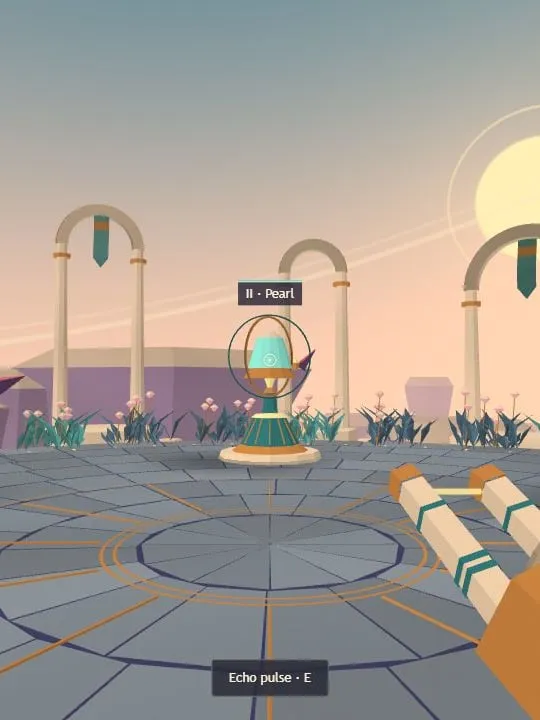
Chimefall is a short, gentle first-person arcade game set in a suspended garden of stone arches and floating bells. Three bells hang on pedestals around you, labelled I Amber, II Pearl and III Rose. Each verse gives you a melody, and you play it by striking the bells in the right order. Hush moths close in on you as you play, and your breath, shown as five diamonds in the corner, is limited.
Finishing a melody summons a gate. You shoot the moth guarding it, then carry the chord through the ring to move on. There are three verses, and you win the run by crossing all three gates before your breath runs out. The E key sends out an echo pulse that pushes nearby moths away; it recharges in four seconds.
The game is drawn in soft, low-poly 3D in warm sunset colours. Chimefall is made by Joyrondo, which sent the game to us; its other games include the tower defence game Night Walker.
How it runs in your browser
Chimefall is made for the browser, so there’s nothing to install. Play opens the game on Joyrondo’s site in a new tab. It needs a browser with WebGL. No account is needed, and your personal best is saved in your browser after a run.
On 19 November 2026, in desktop Chrome, we pressed Enter the garden on the title screen. Verse I, “First light”, began with the three bells around us, a melody panel in the corner, full breath and a score of 0000. The melody started on Pearl, the centre bell; striking it raised the score to 0100 and moved the panel on to the next note. We didn’t finish a run.
Controls and devices
You play with a keyboard and mouse. WASD moves you, you aim and strike by clicking a bell or a moth, and you turn by dragging the mouse or with the arrow keys and Space. E is the echo pulse, and P or Esc pauses. Joyrondo says it needs a browser with WebGL, and we only tested it on a desktop computer.
Tips
- Read the melody panel before you strike, so you hit the bells in order.
- Use the echo pulse when moths crowd you, then strike while they’re pushed back.
- Once the gate appears, shoot its guard moth first, then head for the ring.
- Your best score is kept in the browser, so replay to beat it.
For another game from the same studio, Night Walker is a pixel-art tower defence game against the hopping dead, and Portal is a first-person puzzle game of a very different kind.
How to Play Chimefall: Controls
| Action | Keyboard & mouse |
|---|---|
| Move | WASD |
| Aim and strike | Click a bell or moth |
| Turn | Drag with the mouse, or arrow keys |
| Strike (keyboard) | Space |
| Echo pulse, pushes nearby moths away (recharges in 4 seconds) | E |
| Pause | P or Esc |
Is Chimefall Free, Safe and Official?
Is Chimefall free?
Yes. It’s free in your browser with no account. Joyrondo says nothing is sold on the site at this stage, and that free play now isn’t a promise that later releases stay free.
How long is Chimefall?
It’s a short arcade run of three verses. You win by crossing all three gates before your breath runs out, and your best score is saved in your browser after each run.
How do you play Chimefall?
Each verse shows a short melody. Strike the floating bells in that order, and the verse summons a gate. Shoot the hush moth guarding it, then carry the chord through the ring, and clear all three verses before your breath runs out.
Does Chimefall work on a phone?
Joyrondo says it needs a browser with WebGL, and its controls are made for a keyboard and mouse. We tested it on a desktop computer.