About UFO Hunter PRO
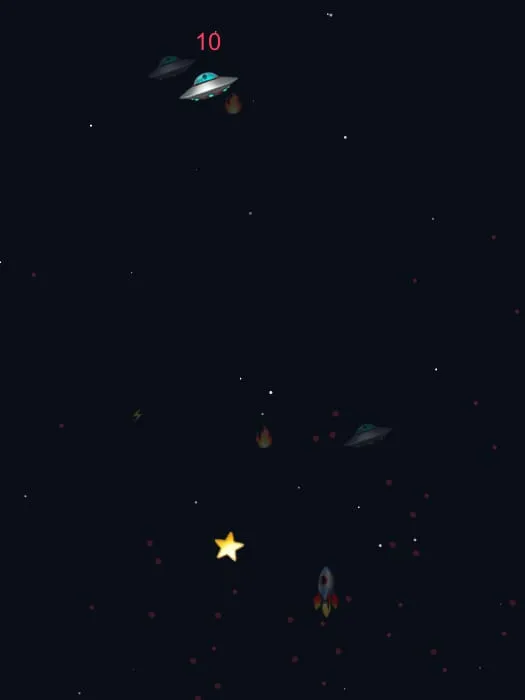
UFO Hunter PRO is a retro arcade shooter set in deep space. You fly a small rocket along the bottom of a starfield, shoot down the flying saucers that sweep across the screen, dodge their fire and the meteors falling from above, and collect bonus stars for extra points. You start with three lives, and a level counter tracks how far you’ve come. A panel beside the playfield keeps your score, high score, lives and level in view, with a few tips: stay on the move, grab the stars and watch for boss UFOs.
It’s the web edition of an iPhone game of the same name, made by Goran Cipar, a solo developer trading as Cipar iOS Solutions, who sent it to us. The developer says they wrote the iPhone version with the AI coding tool Cursor and adapted it for the browser with bolt.new. The site also has a game guide, a blog and a leaderboard.
How it runs in your browser
UFO Hunter PRO is made for the browser, so there’s nothing to install. Play opens the game’s site in a new tab, where Play Now - Free starts a game straight away. No account is needed. The site shows a cookie notice when it opens.
On 24 November 2026, in desktop Chrome, we pressed Play Now - Free and the game started at level 1 with three lives. Our rocket fired a stream of shots at the saucers overhead, and in about ten seconds of shooting and dodging the score climbed from 0 to 500. When we left the rocket alone, it was soon shot down; on the developer’s site the page then went blank instead of showing the end screen. The same game on the developer’s itch.io page ended properly, with a Game Over screen, our score and level, and Play Again and Share buttons.
Controls and devices
You move with the arrow keys or WASD, shoot with Space, pause with P and open the game menu with Esc. The developer says the web edition is keyboard-only and meant for desktop browsers. We tested it on a desktop computer.
Tips
- Keep moving: a rocket that sits still is an easy target.
- Shoot while you dodge. There’s no penalty for holding fire, so keep the shots coming.
- Grab the stars on the way past, but don’t fly into a saucer’s line of fire for them.
- Watch for boss UFOs and give them room.
For another space shooter, JETSUN is a 3D side-scrolling shoot ’em up, and Tyrian 2000 is a classic of the genre. Brinewake Patrol is a lighter arcade shooter made for the browser.
How to Play UFO Hunter PRO: Controls
| Action | Keyboard & mouse |
|---|---|
| Move | Arrow keys or WASD |
| Shoot | Space |
| Pause and resume | P |
| Game menu | Esc |
Is UFO Hunter PRO Free, Safe and Official?
Is UFO Hunter PRO free?
Yes. The web edition is free to play in your browser with no download and no sign-up. Its developer says it’s the official web edition of the iPhone game.
Can I play UFO Hunter PRO on a phone?
Not in the browser. The developer says the web edition is keyboard-only and meant for desktop browsers. The iPhone game is a separate app.
How do I score points?
Shoot down UFOs and fly into the stars that drift down the screen. UFOs are worth more than stars, so keep firing while you weave between them.
What happens when I lose all my lives?
The game ends with a Game Over screen showing your score and level, with Play Again and Share buttons. On the developer’s own site the page went blank at that point in our test, so you may need to reload it.