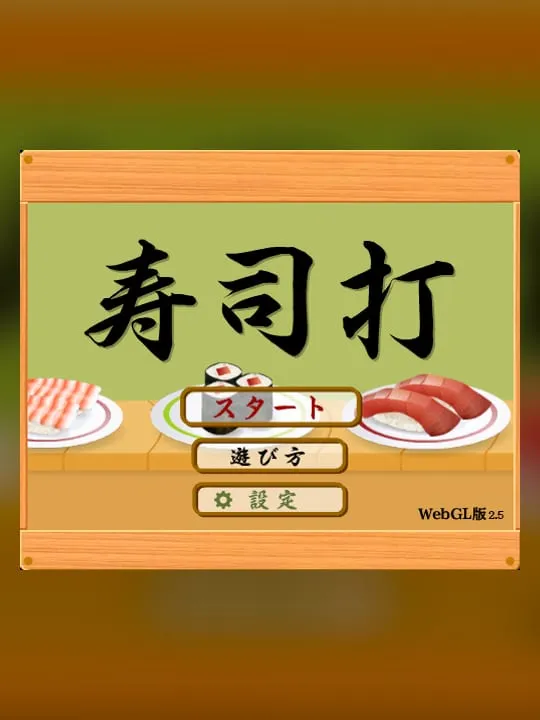
About Sushida
Sushida (寿司打, roughly “sushi typing”) is a typing game from Japan set at a conveyor-belt sushi restaurant. Plates of sushi slide along the counter, each with a Japanese word on it and its romaji spelling underneath, the way you’d type it on a regular keyboard. Type the word correctly before the plate slides off and you eat it, adding its price to your total. You pay for a course at the start, and the aim is to eat more than it cost you: come out ahead and your result goes on the site’s nationwide ranking.
There are three courses, each with its own word length and time limit: 3,000 yen with two- to seven-character words and 60 seconds, 5,000 yen with five to ten characters and 90 seconds, and 10,000 yen with nine to fourteen or more characters and 120 seconds. On top of that you pick one of five difficulties: practice and normal, which differ in speed; accuracy first, where a typo resets the plate; speed required, which ends the round if a plate gets away; and one-shot, which ends it at the first typo or missed plate. A combo meter fills as you type without mistakes and adds one to three seconds to the clock.
Sushida is made by Neutral, a Japanese browser-game site that Japanese Wikipedia describes as run by an individual creator known as Mya. It began as a Flash game; when Flash support ended, the Flash version closed in December 2020 and a WebGL version replaced it. The game is widely used for typing practice in Japan, from school lessons, which the site allows, to typing contests, and Japanese Wikipedia notes that it topped Yahoo! Kids’ search rankings in 2022 and 2023. The site asks players not to use outside tools or to use the game commercially.
How it runs in your browser
The current Sushida runs in WebGL, so it needs a browser with WebGL but nothing to install. Play opens the official site, sushida.net, in a new tab; the game itself is linked from that page. There’s no account to make. The site is in Japanese, and Settings (設定) on the title screen lets you switch the sound, furigana and romaji display.
On 23 November 2026, in desktop Chrome, the game loaded to its title screen, marked WebGL version 2.5, with Start, How to play and Settings. How to play explained the plates, the time limit and the combo meter. Start led to the difficulty and course screen, where we chose practice and the 3,000-yen course. The round began with 57 seconds on the clock and a plate carrying グミ (gumi). By the time our keystrokes went in, the next plate, パパ (papa), had arrived, so they counted as four typos. When time ran out, the results card showed no sushi eaten for our 3,000 yen, which is the game’s way of saying we lost the full price of the course.
Controls and devices
Press Space or Enter to start a round, then type each word in romaji on your keyboard. Sushida accepts the common alternative spellings, so し can be typed as si, shi or ci. If typing stops registering, click the game screen once. It’s a keyboard game, made for computers. We tested it on a desktop computer; we haven’t tried a Chromebook.
Tips
- Start in practice mode on the 3,000-yen course while you learn the romaji for each kana.
- Keep typing without mistakes to fill the combo meter, which adds seconds to the clock.
- Read the whole word before you start typing, especially on the longer courses.
- Use whichever romaji spelling you find fastest; the game accepts the common alternatives.
For more quick games that test speed and accuracy, try 2048 or the daily logic puzzle WhoDunItDoku, and The Impossible Quiz tests your reactions in a very different way.
How to Play Sushida: Controls
| Action | Keyboard & mouse |
|---|---|
| Type the word on the current plate | Romaji on the keyboard (several spellings accepted, such as si, shi or ci) |
| Start a round | Space or Enter |
| Play again from the results screen | Esc |
Is Sushida Free, Safe and Official?
Is Sushida free to play?
Yes. Sushida is free in your browser on its official site, sushida.net, with no download and no sign-up. The site is in Japanese, but the game is easy to follow once you press Start (スタート).
How do you play Sushida?
Sushi plates slide along a conveyor belt, each showing a Japanese word with its romaji spelling underneath. Type the word before the plate leaves the screen to eat it and add its price to your total. When time runs out, the game compares what you ate with the price of your course.
What are Sushida’s modes and courses?
There are five difficulties: practice, normal, accuracy first (a typo resets the plate), speed required (one missed plate ends the round) and one-shot (any typo or missed plate ends it). Each has three courses: 3,000 yen with short words and 60 seconds, 5,000 yen with longer words and 90 seconds, and 10,000 yen with the longest words and 120 seconds.
Who made Sushida?
Neutral, a Japanese browser-game site run by an individual creator known as Mya. Sushida began as a Flash game; when Flash support ended, the Flash version closed in December 2020 and the WebGL version took over.
Can I type in English on Sushida?
No. You type Japanese words using romaji, the Latin-letter spelling of Japanese, so it’s practice for typing Japanese on a regular keyboard. It accepts the common alternative spellings, such as si or shi.