About Alley Cat
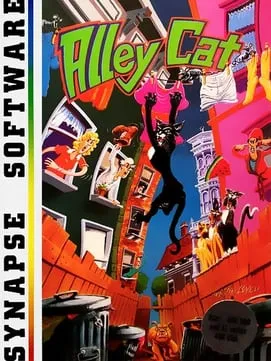
Alley Cat was created by Bill Williams, who also wrote its music, from a concept credited to John Harris. Synapse Software published it for Atari 8-bit computers in 1983. A year later IBM released versions for the IBM PC, as a self-booting disk, and for the IBM PCjr, both drawn in four-color CGA graphics. This browser version is based on that 1984 PC release.
You play Freddy the Cat, who climbs into people’s homes through open windows and carries out tasks inside, all to reach his love, Felicia. The rooms differ. In one, Freddy drinks from 12 milk bowls while dogs sleep nearby, and a full bowl takes several sips. In the hearts room, he can drop gifts on the shelves, and a rival cat that walks into one takes it and stays away for a while. Elsewhere he has to watch for a dog, a cat head popping out of the garbage cans and objects thrown from windows. The game starts at the skill level you choose and gets harder as you clear levels.
How it runs in your browser
This is alleycat.exe by Petar Petrov. It isn’t an emulator running the old disk. Instead, the original 1984 DOS executable was statically recompiled into modern native code, and a web build of that code runs in the browser with WebAssembly. Pressing Play opens the project page in a new tab, with nothing to install and no account. Version 1.3 is also offered for Windows, Linux and macOS.
AI wrote most of this port. The author states that about 99% of the code is LLM-generated, meaning it came from an AI language model, and that it has been only roughly reviewed. The notes advise anyone with concerns about AI-generated code to avoid the project. They don’t mention saving.
Controls and devices
The cursor keys move Freddy and make him jump. Alt, or Option on a Mac, performs special actions: in the milk room you hold it next to a bowl to drink, and in the hearts room it puts a gift down on the nearest shelf. In the options menu, K, H, T and A, or 1 to 4, set the skill level. Ctrl+S turns sound on and off, Ctrl+R returns to the title screen and Esc pauses.
New keys include Ctrl+P, which switches between the default CGA colors and the IBM PCjr palette, plus the life and invincibility cheats. Some shortcuts in the project’s list, such as Ctrl+W to quit, are also browser shortcuts, so avoid them in a tab. You’ll need a physical keyboard.
Who it’s for
It suits people who want to see Freddy again in his CGA or PCjr colors, and anyone curious how a recompiled DOS game behaves. For more early PC games, try Prince of Persia or Dangerous Dave in the Haunted Mansion.
Is Alley Cat Free, Safe and Official?
Was this version of Alley Cat made with AI?
Yes. Petar Petrov, who made alleycat.exe, says about 99% of its code was generated by an AI language model and only roughly reviewed, and the project’s notes suggest avoiding it if that concerns you.
Can I play Alley Cat online for free?
Yes. The web build runs in a browser tab with nothing to install and no account. The same project also offers downloads for Windows, Linux and macOS.
Are there cheats for extra lives in Alley Cat?
This version adds some keys that weren’t in the original: Ctrl+L adds a life, up to nine, Ctrl+K gives infinite lives, and Ctrl+I makes Freddy invincible against the dog, the rival cats and the cat in the garbage cans.