About QWOP
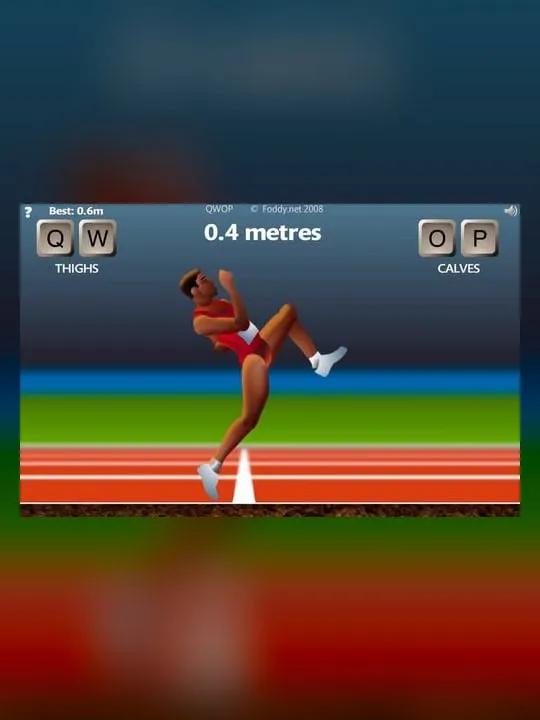
QWOP is a running game in which running is the hard part. You play Qwop, an athlete sent to the Olympic Games to run the 100 metres, and you control his legs directly: Q and W move the thighs, O and P move the calves. There’s no button for “run”. Press the keys in the wrong order, or hold one a moment too long, and the runner does the splits, topples backwards or lands on his head. Most first attempts end a metre or two from the start line.
That’s the joke and the appeal. QWOP is a ragdoll physics game, so every limb swings and flops on its own, and the challenge is finding a rhythm that moves the body forward without tipping it over. Some players inch down the track on one knee; others learn a proper stride. The distance counter at the top of the screen shows how far you got, and a fall ends the run.
Bennett Foddy made QWOP in 2008, while working as a philosophy researcher, and released it on foddy.net that November. It was a modest success at first, then took off at the end of 2010 when it spread on StumbleUpon, Reddit and YouTube. It was shown at a Kill Screen event at the Museum of Modern Art in New York in July 2011 and turned up in an episode of the American sitcom The Office in 2012. In 2013, Guinness World Records recognised a 51-second run as the fastest 100 metres in the game.
Foddy followed it with 2QWOP, a two-player version, and other games built on deliberately awkward controls, including GIRP and CLOP. Getting Over It with Bennett Foddy, the 2017 climbing game, is the best known of them.
How it runs in your browser
QWOP plays on foddy.net, the developer’s own site, and opens there in a new tab when you press Play. Foddy updated the original Flash game to HTML5 in 2016, so it runs in any modern browser without Flash. There’s no account and no sign-up, and the site says it uses no cookies. Foddy points anyone who wants the original Flash version to the Flashpoint archive.
On 19 November 2026, in desktop Chrome, the game loaded to its title card, which explains that you are Qwop, your small nation’s only runner at the Olympic Games, and asks you to click to begin. After a click, we pressed the four keys in turn. Our runner fell flat on his back after −1.2 metres, and the game awarded him a “Participant” ribbon and told us to press Space to restart.
Controls and devices
Click the game to start. Q and W move the thighs and O and P move the calves; Space restarts after a fall. Foddy says the HTML5 version should also work on a smartphone, using on-screen buttons. We tested it on a desktop computer only; we haven’t tried a phone or Chromebook.
Tips
- Tap the keys rather than holding them down. Long presses swing the legs too far and tip the runner over.
- A widely shared technique is to alternate between pressing W and O together and Q and P together, keeping a slow, steady rhythm.
- Keep the upper body over the hips. Once the runner leans too far back or forward, it’s very hard to recover.
- Don’t worry about speed at first. Getting to 10 metres without falling is already an achievement.
For more games from the Flash era, try The Impossible Quiz, Run 3 and Learn to Fly, or browse the Flash games collection.
How to Play QWOP: Controls
| Action | Keyboard & mouse |
|---|---|
| Start a run | Click the game |
| Move the thighs | Q and W |
| Move the calves | O and P |
| Restart after a fall | Space |
Is QWOP Free, Safe and Official?
Can I play QWOP online for free?
Yes. QWOP is free on foddy.net, the developer’s own site, with nothing to download and no account. Bennett Foddy updated it to HTML5 in 2016, so it no longer needs Flash.
What do the Q, W, O and P keys do?
Q and W swing the runner’s thighs, and O and P move the calves. Each key moves one part of both legs at once, so walking means pressing them in the right order and holding them for the right length of time. Falling over ends the run.
Who made QWOP?
Bennett Foddy, an Australian game designer who was working as a philosophy researcher at the time. QWOP came out in November 2008 and became an internet hit at the end of 2010. Foddy later made Getting Over It with Bennett Foddy (2017) and Baby Steps (2025).
Can I play QWOP on a phone?
Foddy says the HTML5 version should work on a smartphone using on-screen buttons. There were also QWOP apps for iOS, released in December 2010, and Android, released in July 2013. We only tested the browser version on a desktop computer.